Crypto currency deposits & withdrawals
Only cryptocurrencies supported by the Safe2transact platform can be deposited or withdrawn. Depositing unsupported assets or using incorrect networks may result in the permanent loss of funds.
Depositing crypto currency:
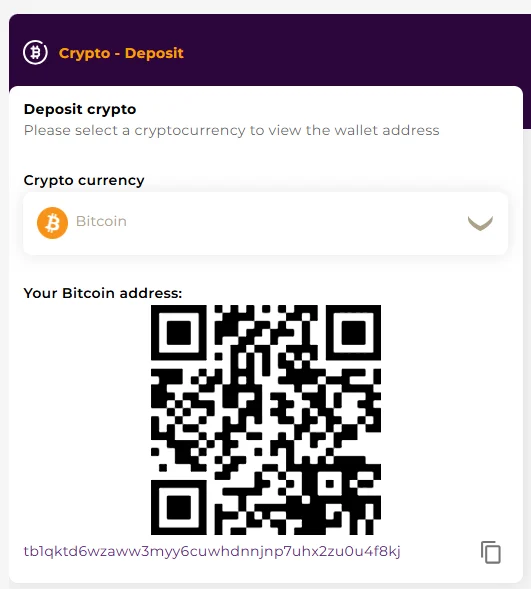
In Safe2transact wallet→ Crypto Balance section, click on Deposit.
- Select the cryptocurrency you would like to deposit.
- Create a deposit address for the selected crypto currency (if this is your first deposit for a specific crypto currency).
- Use the generated deposit address (or corresponding QR code)to transfer funds from your external wallet to your Safe2transact wallet.
- Once the network confirms the transaction, your deposit will appear in your account balance.
Withdrawing crypto currency:
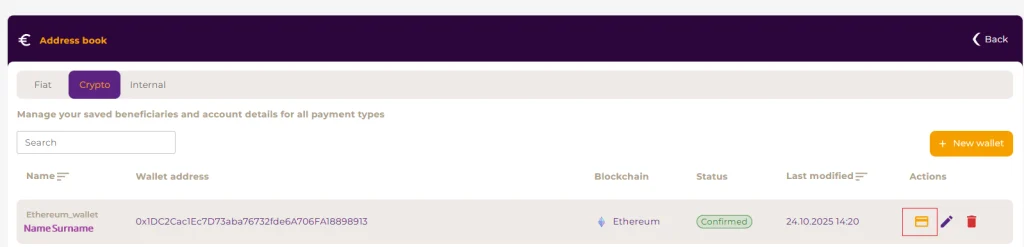
In Safe2transact wallet, go to Address book, Crypto (for external beneficiaries) or Internal (for internal Safe2transact customers) tab.
- Select a wallet and press on Transfer crypto in the Actions list. Click here to learn more on how to add a wallet.
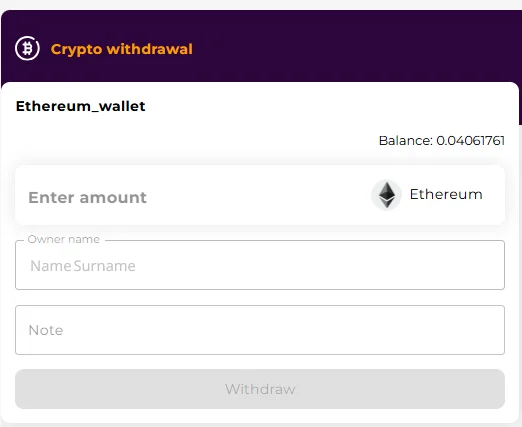
- Enter the amount you wish to withdraw.
- Confirm the withdrawal.
Important information:
Verify network and address: always verify that the selected network and address are correct before confirming any transaction. Cryptocurrencies sent to an incorrect network or address are permanently lost on the blockchain. Safe2transact cannot recover or reverse such transactions under any circumstances.
Tip: Always copy and paste wallet addresses directly from your Safe2transact wallet. Avoid typing them manually or using screenshots.
- Minimum withdrawal amounts: each cryptocurrency has a minimum withdrawal amount to ensure transactions can be processed efficiently on the blockchain. Withdrawals below the required minimum will not be executed.
Click here to learn more about minimum withdrawal amounts.